
Taco Casa Loyalty
Paytronix SystemsFood & Drink
4.641.00 Reviews
- Version
- 26.2.2026012703
- Installs
- 10.00K
- Age Rating
- Everyone
Screenshots
Our Review of Taco Casa Loyalty
 Analysis by Appyee
I tried Taco Casa Loyalty as the kind of app you open when you are already deciding what to eat, not when you want to browse a complicated food platform. Its purpose is straightforward: it is a loyalty and rewards app for Taco Casa, developed by Paytronix Systems. That narrow focus is both its appeal and its main limitation. If Taco Casa is already part of your routine, the app can make repeat visits feel more organized. If you only stop there occasionally, its value depends heavily on whether keeping one more restaurant app on your phone feels worthwhile.
The app sits in the Food & Drink category and is free to use. It is rated for Everyone, so the presentation is accessible rather than aimed at a specialist audience. I also found the experience easier to understand than many broader restaurant apps because it is not trying to combine every possible dining service into one place. The trade-off is that you should not expect it to replace a general delivery, restaurant-discovery, or meal-planning app.
Following a Taco Casa visit from decision to reward
I’d use this section to judge the app by the moments that matter: whether it feels quick enough to check before ordering, how manageable it is when a meal involves several people, and what I’d do if the visit doesn’t appear as expected. Thinking through that sequence also helps separate useful loyalty habits from extra steps that may not suit an occasional Taco Casa customer.
The starting point: deciding whether loyalty is worth the effort
The most realistic starting condition is simple: I am hungry, Taco Casa is one of the nearby choices, and I want to know whether using the loyalty app adds anything to the visit. That is a better test than opening it casually, because a rewards app only earns its place on a phone when it fits naturally into an existing habit.
Before installing it, I would ask myself how often I actually visit Taco Casa. Someone who goes regularly has a clear reason to use a dedicated loyalty tool. The app gives that person a place to manage the relationship with the restaurant instead of relying on memory or hoping a paper promotion is still available. Someone who visits once every few months may find that the extra step of opening the app is less useful than simply ordering and leaving.
The current release is version 26.2.2026012703, and it requires Android 10 or later. That requirement is reasonable for a modern Android phone, but it matters if you are holding on to an older device. I would check compatibility before planning to use the app during a busy meal run, especially if the phone is not regularly updated.
Step one: install, open, and understand the role of the app
The installation is free, which removes the biggest barrier to trying it. I like that the app’s identity is clear from the beginning: this is Taco Casa Loyalty, not a general-purpose food marketplace disguised as a rewards program. That clarity helps me decide quickly whether I am in the right place.
The first useful habit is to open the app before reaching the counter or beginning an order. That gives the loyalty process a chance to become part of the meal rather than an afterthought. If I wait until after paying, I may already have missed the moment when a visit needs to be connected to my account. In practice, the best workflow is to check the app while deciding what to order, then keep it available until the transaction is complete.
I would also avoid treating the app as a passive coupon wallet. The real benefit of a dedicated loyalty app is continuity: each visit should be handled as part of an ongoing account rather than as an isolated promotion. That means it is worth forming a small routine around it, such as opening it before ordering and checking the result afterward.
Step two: move from the phone to the restaurant
This is where the first handoff happens. The app lives on the phone, but the meal happens at Taco Casa. A smooth experience depends on the information or reward state in the app matching what happens at the restaurant. I would not assume that merely having the app installed is enough. The important moment is making sure the visit is recognized through the loyalty process.
For an in-person meal, I would keep the phone unlocked and ready rather than searching for the app while the line moves. That small preparation makes a bigger difference than it sounds. Loyalty programs often feel inconvenient not because the idea is difficult, but because the customer remembers them only when the cashier is waiting and the order is already being finalized.
A useful practical tip is to decide in advance who is using the account. If I am buying food for several people, I would use my own loyalty account consistently instead of switching between family members’ phones. That makes the history easier to follow and avoids the confusion of wondering which account received recognition for the visit.
The app should be treated as one part of the transaction, not as a replacement for checking the order itself. I would still confirm the food, payment, and any reward-related result before putting the phone away. A loyalty app can organize benefits, but it cannot correct an incorrect meal or resolve every restaurant-side issue automatically.
Step three: complete the handoff and check what happened
The second handoff is from the restaurant back to the app. This is the point where I want confidence that the visit has been connected to my loyalty activity. Rather than assuming everything worked because the order was completed, I would take a moment after the transaction to look for the updated status shown in the app.
This check is especially useful when the visit matters to me. If I am close to a reward or intentionally using the program often, discovering a problem immediately is much better than noticing it several visits later. I would keep the receipt until the app reflects the visit or until I am satisfied that the transaction was handled correctly. That is not exciting advice, but it is the kind of small workflow that prevents a loyalty program from becoming frustrating.
The same approach applies when another person is picking up food for me. The handoff is no longer just between my phone and the counter; it also includes the person carrying out the order. In that situation, I would make the loyalty step clear before the pickup rather than expecting someone else to know which account or screen matters. The more people involved, the more important it is to settle the app portion early.
What the result feels like in everyday use
Imagine a weekday evening when I am leaving work and choosing dinner for myself and a family member. Taco Casa is convenient, so I open the app before arriving, make sure I am using the correct account, and keep the phone ready during the purchase. After the order is complete, I check the app instead of assuming the loyalty activity has been recorded. The outcome is not a dramatic change to the meal; it is a more dependable routine around repeat visits.
That distinction matters. This app is most useful when the reward process is part of a pattern. The value builds through consistency, not through one isolated opening. I would recommend it to someone who already knows they will return to Taco Casa and wants a simple way to keep those visits connected.
Its average rating is 4.6 from around a hundred ratings, and the app has passed ten thousand installs. Those figures suggest that it has found an audience, although they do not remove the need to judge whether the workflow suits your own habits. A loyalty app can be well received and still be unnecessary for a person who rarely visits the associated restaurant.
Where the workflow becomes less comfortable
The main weakness is the dependence on timing and cooperation. The app is useful only if I remember to use it at the right point in the restaurant visit. Opening it after everything is finished is less helpful than having it ready before ordering. That creates a small but real mental burden, particularly when I am in a hurry, carrying food, or managing children.
Another possible friction point is the separation between the digital account and the physical restaurant experience. The app can present the loyalty side, but the actual meal still depends on the Taco Casa location and the transaction being handled correctly. When something does not line up, I may need to keep a receipt and explain the situation rather than solving everything from the screen.
I would also skip it if I am looking for broad restaurant choice. A delivery marketplace or general food-ordering app is a better fit when I want to compare nearby restaurants, browse several cuisines, or manage orders from different businesses. Taco Casa Loyalty is intentionally narrower. Its strength comes from being dedicated to Taco Casa, and that same dedication prevents it from being a universal dining companion.
People who dislike maintaining separate accounts for individual restaurants may also find the trade-off unattractive. One dedicated loyalty app can be manageable, but several restaurant apps quickly create clutter. In that case, I would use this one only if Taco Casa is a frequent choice and the rewards justify the extra place to check.
Small habits that make the app more useful
Open the app before ordering, not after paying. This puts the loyalty step inside the transaction instead of treating it as an afterthought.
Keep the phone available until the visit appears to be handled correctly. Holding on to the receipt is sensible when the transaction is important or the app does not immediately show the expected result.
Use one account consistently for shared meals. This keeps the loyalty history easier to follow when one person orders for several people.
Review the app before a planned Taco Casa stop. A quick check can help me remember the program and decide whether using it is worthwhile that day.
Do not install it solely for occasional curiosity. The app makes more sense when Taco Casa is already a repeat destination.
How it compares with the usual alternatives
Compared with paper promotions, a digital loyalty app is easier to keep with me because it travels on the phone I already carry. It can also make repeat visits feel more coherent than collecting loose receipts or trying to remember which offer applies. The downside is that a paper offer may require less preparation: I can hand it over without navigating an app, while the digital route depends on my phone, my attention, and the restaurant-side handoff all working together.
Compared with a broad restaurant app, Taco Casa Loyalty is less flexible but more focused. A general platform is better for discovery and variety. This app is better when the decision has already been made and Taco Casa is the destination. I would not choose between them as if they served the same purpose; I would use the general app for finding food and this one for maintaining a Taco Casa-specific routine.
Compared with doing nothing, the app offers a chance to make repeat visits count toward a loyalty relationship. But “free” does not mean costless in practical terms. I still spend time installing it, opening it, and checking the transaction. For a regular customer, that effort may be minor. For an infrequent visitor, the simpler alternative may genuinely be to skip the app.
Who should use it and who should pass
I think it is a good match for regular Taco Casa customers who want a dedicated rewards experience and are comfortable using their phone during the ordering process. It is also useful for households where one person frequently picks up food and wants a consistent account rather than relying on memory.
I would be more cautious if you rarely visit Taco Casa, use an Android device below the required operating system, or prefer not to manage restaurant-specific apps. The Everyone age rating makes it broadly approachable, but accessibility of presentation does not change the practical question of whether the restaurant is part of your routine.
The developer, Paytronix Systems, gives the app a specialized loyalty focus rather than turning it into a sprawling food service. I appreciate that restraint. At the same time, the narrow scope means I would not recommend it as a standalone food app for someone who wants menus, restaurant comparisons, or a single place to manage many brands.
My final take after following the whole process
Taco Casa Loyalty works best when I treat it as a small part of a repeat-visit ritual: open it before ordering, complete the restaurant handoff carefully, and check the result afterward. That workflow is more important than the app’s simple store summary because it explains where the real value appears and where frustration can begin.
My recommendation is positive but specific. If Taco Casa is one of your regular stops, the free price makes trying it an easy decision, and the focused design should be easier to live with than a broad platform when all you want is Taco Casa loyalty. If your visits are rare or you want one app for every restaurant, I would choose a different approach.
The best reason to install it is consistency, not curiosity. Used before and after each relevant visit, it can make the loyalty side of Taco Casa feel more deliberate. Used only after the meal or once in a while, it is much less likely to earn a permanent place on your phone.
Verdict
Strengths of Taco Casa Loyalty
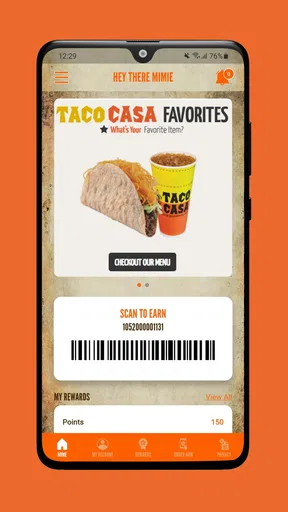
- Earn points automatically when scanning purchases at participating locations.
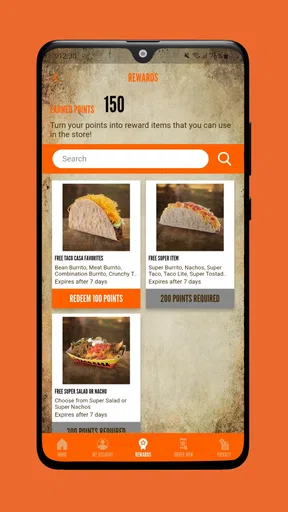
- Redeem rewards directly from the app without carrying a physical loyalty card.
- Digital offers can provide extra value on selected Taco Casa visits.
- Simple interface makes checking points and rewards quick.
- Helps keep Taco Casa promotions and account details in one place.
Limitations of Taco Casa Loyalty
- Availability and benefits may vary by Taco Casa location.
- Requires an account and personal information to use loyalty features.
- Points or rewards may have expiration dates and usage restrictions.
- App value is limited if you rarely visit Taco Casa restaurants.
- Offers and rewards may change without much advance notice.
Other Releases by Paytronix Systems
View All
Black Rock Coffee Bar
Food & Drink4.4
Similar Picks in This Category
View All
Rappi: Food Delivery, Grocery
Rappi, Inc - Delivery3.5

McDonald’s: Cupons e Delivery
Arcos Dorados4.3

Swiggy: Food Instamart Dineout
Swiggy4.7

Blinkit: Groceries & more
Blinkit4.8

foodpanda: food & groceries
Foodpanda GmbH a subsidiary of Delivery Hero SE4.0

Zomato: Food Delivery & Dining
Zomato4.7
Frequently Asked Questions
What is Taco Casa Loyalty, and what can I do with the app?
Taco Casa Loyalty is the official rewards app for participating Taco Casa restaurants. After creating an account, you can typically earn points or rewards from eligible purchases, view available offers, check your loyalty balance, and redeem benefits. The exact features may vary by location, so it is worth confirming that your nearest Taco Casa restaurant participates before relying on the app for rewards.
How do I earn points or rewards with Taco Casa Loyalty?
To earn rewards, users generally need to identify their loyalty account when placing an eligible order, either by scanning the app, providing account details, or following the instructions shown in the app. Some promotions may require activating an offer first. Points, qualifying purchases, and exclusions can differ by restaurant or campaign, so review the reward terms carefully and keep your receipt if a transaction does not appear correctly.
Can I use Taco Casa Loyalty for online, in-store, or delivery orders?
The available ordering and loyalty options depend on the Taco Casa location and the version of the app. Some restaurants may support in-store scanning or mobile ordering, while others may offer rewards only for purchases made directly at participating locations. Third-party delivery orders may not qualify unless the promotion specifically says otherwise. Check the app’s restaurant page and offer conditions before ordering.
Do Taco Casa Loyalty rewards expire, and are there any restrictions?
Rewards and promotional offers may have expiration dates, redemption limits, minimum purchase requirements, or location-specific restrictions. Certain menu items, taxes, delivery charges, and special promotions may be excluded from earning or redemption. Because terms can change, open each reward in the app before visiting the restaurant and confirm the expiration date, eligible products, and any conditions that must be met.
Is Taco Casa Loyalty free, and what information is required to register?
Joining Taco Casa Loyalty is generally free, although users may need to provide information such as an email address, phone number, password, or basic profile details to create an account. The app may also request permission for notifications or location-based features, which are usually optional. Review the privacy policy and app permissions, and use current account information so you can recover access and receive important reward updates.
